Co-Working and Corporate Campus Drone Photography in Bangalore
How office campuses, co-working operators and business parks can plan aerial visuals for leasing, recruitment, brand films and investor...
By SkyViews Aerial Drone Studio
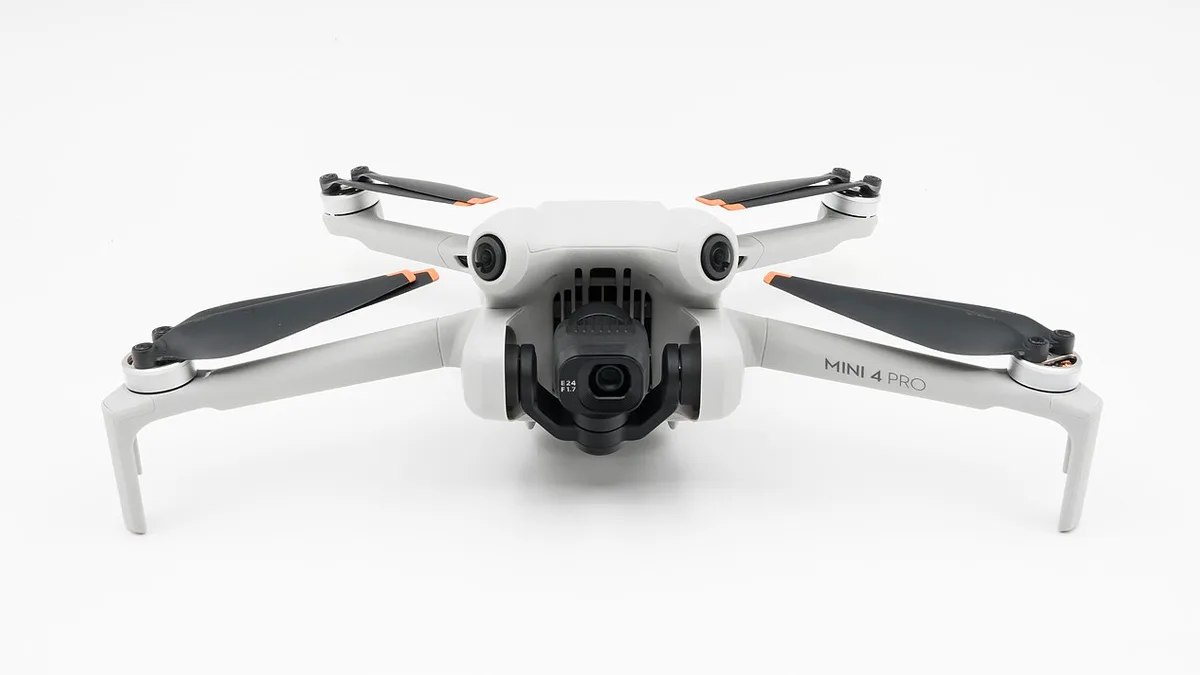
A corporate campus is more than a set of buildings. A visitor needs to understand the entrance. A leasing prospect may want to see how the blocks, parking and open areas connect. A job candidate may be interested in the setting and daily experience. Drone photography can show the campus layout and surrounding context, but one generic aerial film rarely answers every audience's question.
This guide is for coworking operators, business parks and company communications teams in Bangalore. It explains how to plan aerial content for leasing, recruitment and brand use while protecting people who work on the site. The property team should approve facts about current amenities and access. The pilot and site team should decide whether each proposed view can be captured safely under actual conditions.
Audience Definition & Campus Mapping
Pick the viewer before the shot list
Start with the main use. A leasing page needs a clear view of buildings, entrances, outdoor areas and nearby context. A recruitment film may need a sense of place but also ground-level workplace scenes. An investor report may need dated views of occupied buildings and new development. A wayfinding clip should show the route a visitor will really use.
Write one sentence for each audience and a list of questions it may ask. For example, a first-time visitor may ask which gate to use and where the reception sits. A prospective tenant may ask how the buildings relate to parking and shared space. The aerial camera can explain those relationships. It cannot prove lease terms, occupancy or service quality from a view of the roof.
If the shoot must serve several audiences, make a content matrix. Match each planned image or clip to its audience, channel, caption, approval owner and use period. This prevents a recruiting edit from accidentally using a leasing claim or a tenant-specific area as a general campus amenity.
Map the campus and its actual access
Ask the facilities team for a current site plan. Identify the gates, building names, drop-off, parking, pedestrian routes, landscape areas and shared facilities that may be filmed. Some business parks have several addresses or entrances. Use the names people see on signs and in visitor instructions.
Plan a wide establishing view and a sequence that follows the real arrival route. A dramatic rear-side angle may show the architecture but leave a visitor confused about access. Pair aerial context with ground images of the gate and reception where needed. If a road is only a service entrance, do not present it as the main visitor approach.
Show the surrounding district without exaggerating connection. A nearby road, station or commercial area may appear in the frame, but travel times and transport claims need the property team's verified data. Do not use a crop or graphic that makes a future connection appear open today.
Separate permanent and temporary features
An outdoor seating area may be seasonal. An event stage may be present for one day. A cafeteria may serve only certain buildings or tenants. The content brief should identify what is permanent, shared, tenant-specific, temporary or planned. Captions and voiceover should use those distinctions.
This is especially important on a campus still growing. A completed building may stand next to a construction zone or future parcel. Aerial images should date the site state. If a proposed block appears as a render over current footage, label it clearly and keep the original image. A viewer should be able to tell what exists and what is visualised.
Review signs and tenant logos before filming. A brand may not want its office to imply endorsement of the whole property campaign. The property owner should decide which signs may appear and who approves public use.
Workday Safety & Multi-Platform Production
Plan around an occupied workday
An office campus has employees, deliveries, security, visitors and sometimes sensitive operations. The site lead and pilot should review launch locations, roof access, people movement, vehicle routes and no-film areas. A weekend or low-activity window may make architecture capture simpler, but it may not represent normal campus life. Choose the time for the story and the safe operating plan.
If people-focused content is needed, plan it separately with the company's consent and release process. Do not treat incidental employees in a wide aerial frame as a substitute for a designed workplace scene. A ground camera can often show human activity more clearly with better control.
Notify security and reception teams. An unexpected drone over a live workplace can cause concern. The crew should know who can stop the shoot if the site changes. A delivery truck, event or maintenance operation may block a view; note the gap and use a backup shot rather than improvising around people.
Protect private and sensitive detail
High camera positions can reveal terraces, windows, desks, badges, car plates and security layouts. Frame the building and public areas without collecting more detail than the campaign needs. Review the raw and edited material for information in the background, not just the main subject. A wide view may make a tenant area appear small on screen but still visible at full resolution.
Set an access policy for source files. The internal team may need full-resolution originals for later edits, while a broker only needs approved public images. Keep those folders separate. A tenant may approve one campaign but not an unrelated future use, so record the intended channels and time period.
If a sensitive view is essential for an internal facilities record, do not assume it can also be used in a public film. The content package can have separate internal and public versions with a clear review path.
Capture stills and motion for real channels
For leasing, request stills that show the building clearly and leave room for text in a web banner or brochure. For a brand film, capture steady campus views and a few purposeful moves that help the viewer understand scale and circulation. For social clips, plan vertical framing at capture time; a long campus can be difficult to fit in a narrow crop.
Record clean footage without titles and logos when possible. Tenant mix, building names and services can change. A clean master lets the client make a later version without reusing an outdated claim. Keep a shot index so an editor can tell which block and date a clip shows.
If the brief includes an annual report, make the date visible in the internal archive. A current occupancy or expansion claim should come from verified company records. The aerial image can illustrate the campus, not prove a reported number.
Editorial Scripting & Reusable Handoff
Build an accurate script and caption sheet
Before editing, the property team should confirm building names, gate labels, amenity status, tenant permissions and any location claim. A simple sheet can list permitted wording and information that must not appear. This is faster than correcting a polished film after a factual review.
Use plain captions that say what the viewer can see: “Main pedestrian approach between Blocks A and B” or “shared courtyard photographed in October”. Avoid claims such as “minutes from every business district” without a defined, verified basis. If a proposed facility is shown, label it as proposed.
Give one owner responsibility for consolidating approval from facilities, security, marketing and any tenant whose material appears. Without that sequence, an editor may receive conflicting comments after the deadline.
Deliver a package the team can maintain
Agree the final film, stills, vertical edits, thumbnails, captions, clean masters and source-file status. Name files by project, use, aspect ratio and version. Separate approved public assets from internal review and raw capture. Include the capture date and a short note on what was not filmed.
Test the files on the website or presentation system where they will be used. A large master may look good in an edit suite but load poorly on a leasing page. The client can use a web export while preserving the high-quality original in its archive. Decide who can make later edits and where the current approved version lives.
Example: one campus, three outputs
Imagine a business park with two occupied buildings and a third under construction. The leasing edit uses approved exterior views of the two occupied blocks, the main entrance and shared outdoor space. The recruiting edit adds consented ground-level scenes of employees and uses the aerial view only to establish the setting. The investor version shows the third block as construction progress with a capture date. Each output is truthful because the same site footage is selected and captioned for a defined audience.
A good campus shoot makes a complex property easy to understand while respecting the people who use it. For related production choices, see the corporate brand-film guide and privacy guide.
Plan your project
Share your site, dates and intended output so we can confirm a suitable scope.
Aerial Imaging & Cinematics · Compare project scope · Get in touch
Related reading
- Campus Drone Photography in Bangalore: Corporate, School & Institutional Sites
- Hospital and Healthcare Campus Drone Photography in Bangalore
- School and College Campus Drone Photography in India: Planning Guide
- Archaeological Excavation Drone Mapping in India: Documentation Guide
- Forest Restoration Drone Monitoring in India: Ethical Mapping Guide
- Floodplain Drone Mapping and Water-Risk Documentation in India
Contact SkyViews Aerial Drone Studio at +91 90190 56479 or skyviewsdronestudio@gmail.com. Service area: Bangalore, Karnataka and India and wider Bangalore, Karnataka and India.